InvoisLaju › Guides › Invoice a freelance project without retyping the job
Guide
Invoice a freelance project without retyping the job
Designers, photographers, developers and consultants need an invoice the client can match to the work they approved. Start with the project and payment details, then choose a format that makes those details easy to check.
Match the invoice to the pricing arrangement the client accepted. Use a separate line for a separate deliverable or billing period, and make revisions or extra work identifiable.
Arrangement
Example line
Amount
Fixed project
Landing-page design: one page and two revision rounds · 1 × RM1,200
RM1,200
Hourly service
Website maintenance, 1–15 October · 6 hours × RM80
RM480
Approved extra
Additional social graphic, approved 20 October · 2 × RM90
RM180
These are three independent pricing examples, not a market-rate recommendation or a combined invoice. Keep your time log or the client's approval alongside the document when relevant.
What to ask your client before invoicing
The billing name and address they want on the document.
A purchase-order, project or job reference, if their process uses one.
The agreed currency, amount and payment date or payment terms.
The person or email address that processes payment.
Whether their finance team needs any transaction-specific details beyond your usual invoice.
Use your own correct business details. Do not invent a registration number or add a tax charge just because a sample has a field for it. Check applicable requirements separately if your situation involves SST or e-Invoice obligations.
Build the invoice in InvoisLaju
Select your business profile and customer. If you operate more than one business, check which business will appear on the PDF.
Choose Invoice, the document language and the agreed currency.
Add the project or hourly items, then include the project reference, deliverables and payment terms in the appropriate fields or notes.
Record any money already received so the balance is clear. Check the preview before exporting.
Download the PDF and send it with a short message naming the project, amount due and due date.
A downloadable invoice example
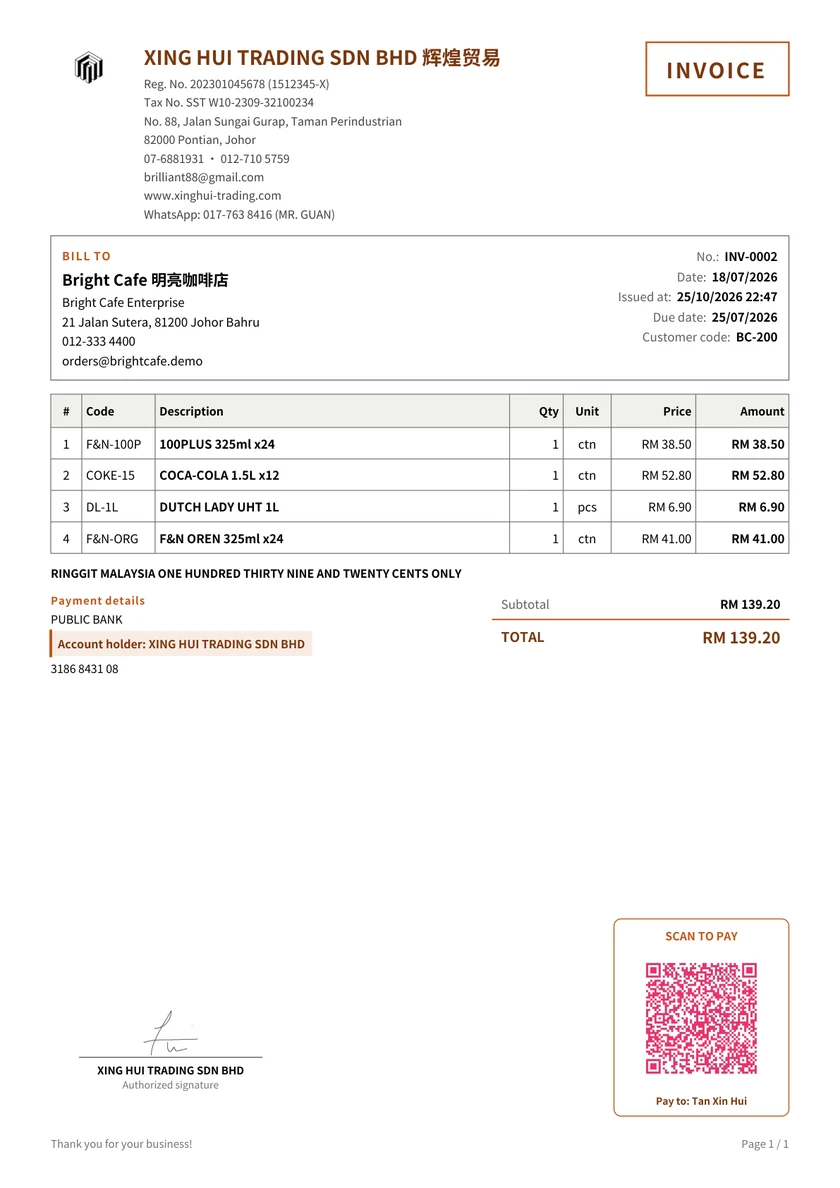
An original XING HUI TRADING goods invoice with logo, signature and payment QR. Use it to check the layout; enter your own service descriptions for freelancer work.
For a fictional RM1,200 project with RM400 received, the remaining balance is RM800. Keep the amount received distinct from the total project price. If you need a receipt for that deposit, create a standalone receipt for RM400 and reference the job or invoice in the notes.
InvoisLaju's linked-receipt action becomes available for an issued invoice when it is fully paid. It does not automatically create a separate receipt for each partial payment. Do not use a full-payment receipt to describe only a deposit.
Billing an overseas client in USD
Select USD before entering the agreed prices. Changing the currency code does not exchange MYR amounts into USD: enter the amount agreed with the client and check the preview. Clarify bank charges and payment arrangements with the client separately. See business profiles and MYR/USD invoices for a repeatable check.
Keep a copy you can find again
Web history requires Google sign-in. The working data is stored in that browser; optional authorized Drive backup and restore can help keep a recoverable copy. Signing in does not make the Web and Android workspaces synchronize live.
The free plan has no time limit. It includes three footer-free exports each month; later exports carry an InvoisLaju footer. Premium templates, signatures and payment QR have separate trial allowances. Review the plan details before choosing an optional paid feature.
Prepare your next freelance invoice
Use the actual project details, record any deposit received, and check the balance before you send the PDF.