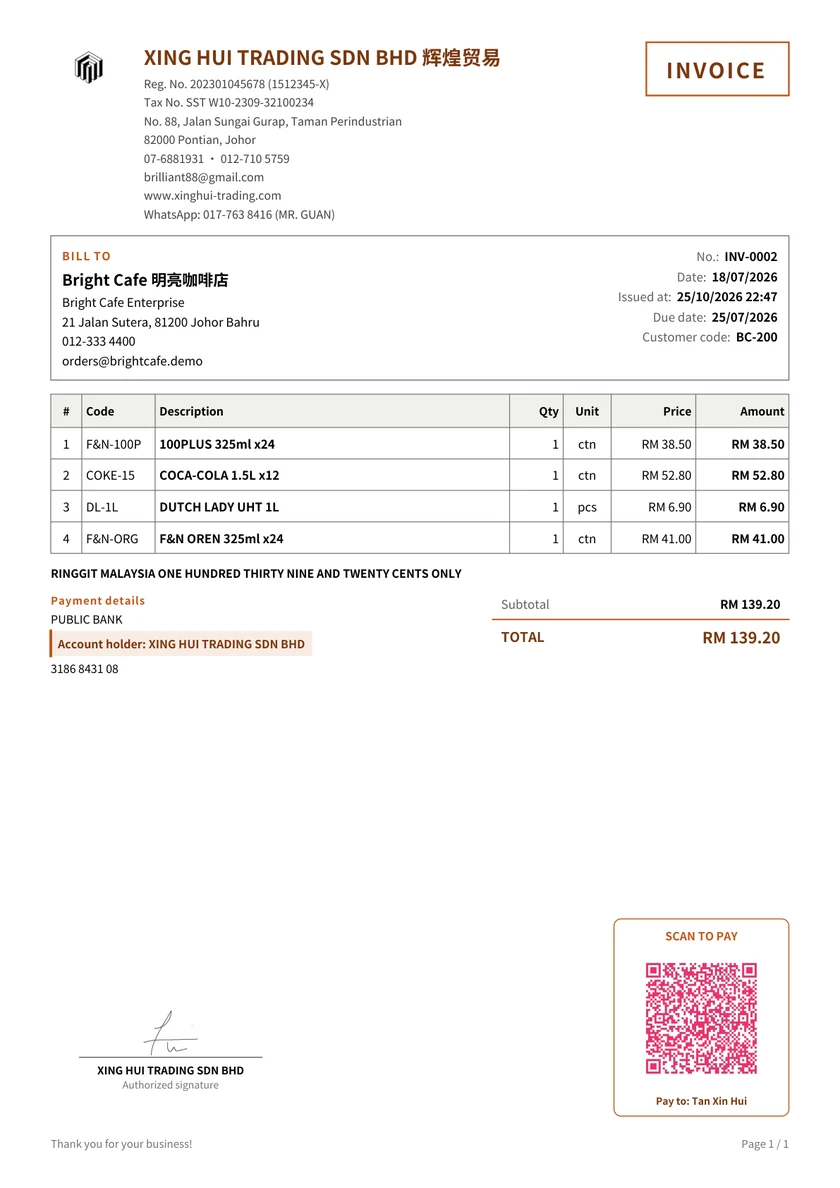
Use a completed invoice to check the layout, then fill it with the details of your own sale. The useful parts are the business and customer information, a clear item list, the agreed currency and an amount the customer can reconcile.
This service-invoice example shows the output you can make in InvoisLaju. Review it before entering your own information. To edit a new invoice, use the browser editor rather than typing over the PDF.
An original XING HUI TRADING document exported from the existing workspace, with its logo and signature. Use it as a layout reference and enter your own details.
Invoice, with a unique number you can use to identify the transaction
Your business
Correct business name, address and contact details; registration details where applicable
Customer
The billing name and address requested by the customer, plus a job or purchase-order reference if needed
Dates and terms
Invoice date, agreed payment terms and due date
Items
Description, quantity, unit price and line amount for each product or service
Currency and adjustments
The agreed currency, and any applicable discount, tax or delivery charge shown clearly
Total and payments
Total invoice amount, money already received and remaining balance
Payment instructions
The correct bank or other payment details and a reference to use when paying
This is a practical document checklist, not a universal tax-compliance checklist. Do not copy an SST rate or registration number from a sample. Where SST applies, check the current Royal Malaysian Customs guidance and our source-backed SST invoice guide. An exported PDF is not an e-Invoice submitted to MyInvois.
Check the arithmetic with a simple example
For two fictional service items priced at RM300 and RM200, with an agreed RM25 discount and no other charges in this example: RM300 + RM200 − RM25 = RM475. If RM100 has already been received, the remaining balance is RM375. These example figures are separate from the downloadable sample.
Check both the totals and the meaning of the fields. A deposit belongs in money received, not as a discount on the work.
Word, Excel or an online invoice maker?
Format
Useful when
Check carefully
Word or a document template
You want direct control over a one-off layout
Keep the previous file, use a new number and verify the arithmetic
Excel or a spreadsheet
You already maintain a spreadsheet workflow
Check formula ranges and the printed PDF after adding rows
InvoisLaju
You want reusable business/customer details and invoice, quotation and receipt output in one place
Review the selected business, currency, payment details and preview before export
This page provides a PDF example. It does not promise Word or Excel downloads. The online editor lets you create your own invoice and export it as PDF or PNG.
Choose a number you can trace
Use a consistent pattern such as INV-2026-0001 and avoid assigning the same invoice number to different transactions. Keep issued copies and a record of changes or cancellations. If you use several businesses, check the business as well as the number when finding an old invoice.
Create your invoice online
Open an Invoice and select the correct business and customer.
Choose the document currency and language, then enter the item details.
Add relevant terms, payment instructions and any amount already received.
Check the full preview and download the PDF to send to your customer.
The free plan has no time limit and includes three footer-free exports each month. Later exports carry an InvoisLaju footer; premium templates, signatures and payment QR have separate trial allowances. Google sign-in is required for Web history. Working data is stored in the browser, with optional authorized Drive backup and restore; this is not live synchronization with Android.
Create an invoice with your own details
Start in your browser, check the preview, and download the PDF. Compare the Free and Pro allowances before choosing optional features.